AI Tools for Legal Professionals: Automate Legal Workflows Without Coding
Legal professionals spend 40-50% of their time on repetitive administrative tasks: document review, contract analysis, legal research summarization, client communication, and case preparation. Custom AI tools can automate these legal workflows in minutes—without any programming experience required.
Whether you're a solo practitioner managing case files, an associate reviewing contracts, a paralegal handling discovery, or a legal operations manager optimizing workflows, building AI tools for legal work can save you 20+ hours weekly while improving accuracy.
Why Legal Professionals Need Custom AI Tools
Generic AI tools can't handle the precision, confidentiality, and specialization that legal work requires. Custom AI tools offer:
- Practice area-specific automation - Tailored to your legal specialty
- Client-confidential processing - Process sensitive data securely
- Consistent accuracy - Reduces human error in repetitive tasks
- Billable hour optimization - More time for high-value legal work
- Zero technical skills needed - Built in under 60 seconds
- Team-wide efficiency - Share with associates and paralegals instantly
Real Legal AI Tools You Can Build Today
Contract Review & Analysis Tools
Contract Key Terms Extractor:
- Input: Contract PDF (NDA, MSA, employment agreement)
- Output: Excel with parties, dates, payment terms, termination clauses, liability caps
- Use case: Contract review and database
- Time saved: 15 minutes per contract
- Impact: Faster due diligence, searchable contract database
Contract Redline Analyzer:
- Input: Two versions of contract (original + marked-up)
- Output: Summary of changes, risk assessment, negotiation points
- Use case: Contract negotiations
- Time saved: 25 minutes per redline review
- Impact: Never miss critical changes
Non-Standard Clause Detector:
- Input: Contract PDF
- Output: Clauses that deviate from your standard templates with risk flagging
- Use case: High-volume contract review
- Time saved: 20 minutes per contract
- Impact: Consistent risk management
Contract Renewal Date Tracker:
- Input: Multiple contract PDFs
- Output: Spreadsheet with contract name, parties, renewal dates, notice periods
- Use case: Contract management
- Time saved: 10 minutes per contract
- Impact: Never miss renewal deadlines
Legal Research & Case Prep Tools
Case Law Citation Extractor:
- Input: Legal brief or opinion PDF
- Output: Complete citation list with jurisdiction, date, relevance notes
- Use case: Legal research, brief writing
- Time saved: 30 minutes per document
- Impact: Comprehensive citation management
Deposition Summary Generator:
- Input: Deposition transcript
- Output: Executive summary, key admissions, contradictions, exhibits referenced
- Use case: Case preparation
- Time saved: 90 minutes per deposition
- Impact: Faster trial prep
Legal Memorandum Outliner:
- Input: Case facts, legal issues, research findings
- Output: Structured memo outline with IRAC format
- Use case: Research memoranda
- Time saved: 45 minutes per memo
- Impact: Consistent format, faster drafting
Discovery Document Analyzer:
- Input: Discovery documents (emails, contracts, reports)
- Output: Privilege log entries, relevance scoring, key parties/dates
- Use case: Document review
- Time saved: 5 minutes per document
- Impact: Faster discovery process
Client Communication Tools
Client Intake Form Analyzer:
- Input: Completed client intake form
- Output: Case summary, conflict check info, initial legal issues identified
- Use case: New client onboarding
- Time saved: 15 minutes per new client
- Impact: Faster case assessment
Legal Status Update Generator:
- Input: Case notes, recent activity
- Output: Client-friendly status update email
- Use case: Client communication
- Time saved: 12 minutes per update
- Impact: Better client relationships
Demand Letter Writer:
- Input: Facts, damages, legal basis, desired outcome
- Output: Professional demand letter with legal citations
- Use case: Pre-litigation demands
- Time saved: 45 minutes per letter
- Impact: Consistent quality
Settlement Offer Analyzer:
- Input: Settlement offer terms, case value analysis
- Output: Pros/cons summary, recommendation framework for client
- Use case: Settlement negotiations
- Time saved: 30 minutes per offer
- Impact: Data-driven settlement advice
Document Drafting Tools
Motion Template Filler:
- Input: Case facts, legal standard, supporting evidence
- Output: Draft motion with case-specific details filled in
- Use case: Litigation practice
- Time saved: 60 minutes per motion
- Impact: Consistent motion quality
Discovery Request Generator:
- Input: Case type, information needed, opposing party
- Output: Interrogatories, document requests, admission requests
- Use case: Discovery phase
- Time saved: 90 minutes per set
- Impact: Comprehensive discovery
Engagement Letter Creator:
- Input: Client details, matter type, fee arrangement, scope
- Output: Complete engagement letter with terms
- Use case: Client onboarding
- Time saved: 30 minutes per letter
- Impact: Clear client expectations
Cease and Desist Letter Writer:
- Input: Infringement details, client info, demands
- Output: Professional C&D letter with legal basis
- Use case: IP enforcement, disputes
- Time saved: 45 minutes per letter
- Impact: Faster response to violations
Compliance & Regulatory Tools
Privacy Policy Generator:
- Input: Business details, data practices, jurisdictions
- Output: GDPR/CCPA-compliant privacy policy
- Use case: Corporate compliance
- Time saved: 3 hours per policy
- Impact: Regulatory compliance
Regulatory Update Summarizer:
- Input: New regulation text or official notice
- Output: Plain-language summary, client impact analysis, action items
- Use case: Client advisory
- Time saved: 60 minutes per regulation
- Impact: Timely client guidance
Compliance Checklist Generator:
- Input: Regulation or standard (SOX, HIPAA, GDPR)
- Output: Compliance checklist with requirements
- Use case: Compliance audits
- Time saved: 2 hours per checklist
- Impact: Systematic compliance
Contract Compliance Audit Tool:
- Input: Contract obligations, current practices
- Output: Compliance gap analysis, remediation steps
- Use case: Contract management
- Time saved: 45 minutes per contract
- Impact: Reduced breach risk
Billing & Practice Management Tools
Time Entry Narrative Generator:
- Input: Tasks performed (brief notes)
- Output: Professional billing narratives with task codes
- Use case: Daily time entry
- Time saved: 10 minutes daily
- Impact: Better billing descriptions
Fee Agreement Analyzer:
- Input: Matter type, complexity, estimated hours
- Output: Fee recommendation with comp market data, alternative billing structures
- Use case: New matter pricing
- Time saved: 30 minutes per analysis
- Impact: Competitive pricing
Conflict Check Report Generator:
- Input: New client/matter details, opposing parties
- Output: Conflicts search summary, clearance recommendation
- Use case: Client acceptance
- Time saved: 20 minutes per check
- Impact: Reduced conflicts
Matter Budget Creator:
- Input: Case type, jurisdiction, complexity factors
- Output: Phased budget with deliverables and hours
- Use case: Client budgeting
- Time saved: 60 minutes per budget
- Impact: Better cost management
Litigation Support Tools
Trial Exhibit List Generator:
- Input: Case documents, witness list, themes
- Output: Organized exhibit list with descriptions
- Use case: Trial preparation
- Time saved: 90 minutes per trial
- Impact: Organized trial materials
Witness Examination Outline:
- Input: Witness background, relevant facts, theory of case
- Output: Direct or cross-examination outline with questions
- Use case: Trial preparation
- Time saved: 2 hours per witness
- Impact: Thorough examinations
Expert Report Summarizer:
- Input: Expert report PDF
- Output: Key opinions, methodology, weaknesses, cross-exam topics
- Use case: Expert witness prep
- Time saved: 45 minutes per report
- Impact: Effective expert challenges
Jury Instruction Drafter:
- Input: Legal issues, applicable law, case specifics
- Output: Proposed jury instructions with citations
- Use case: Trial preparation
- Time saved: 3 hours per set
- Impact: Comprehensive instructions
How to Build Your First Legal AI Tool
Step 1: Access the Legal AI Tool Builder
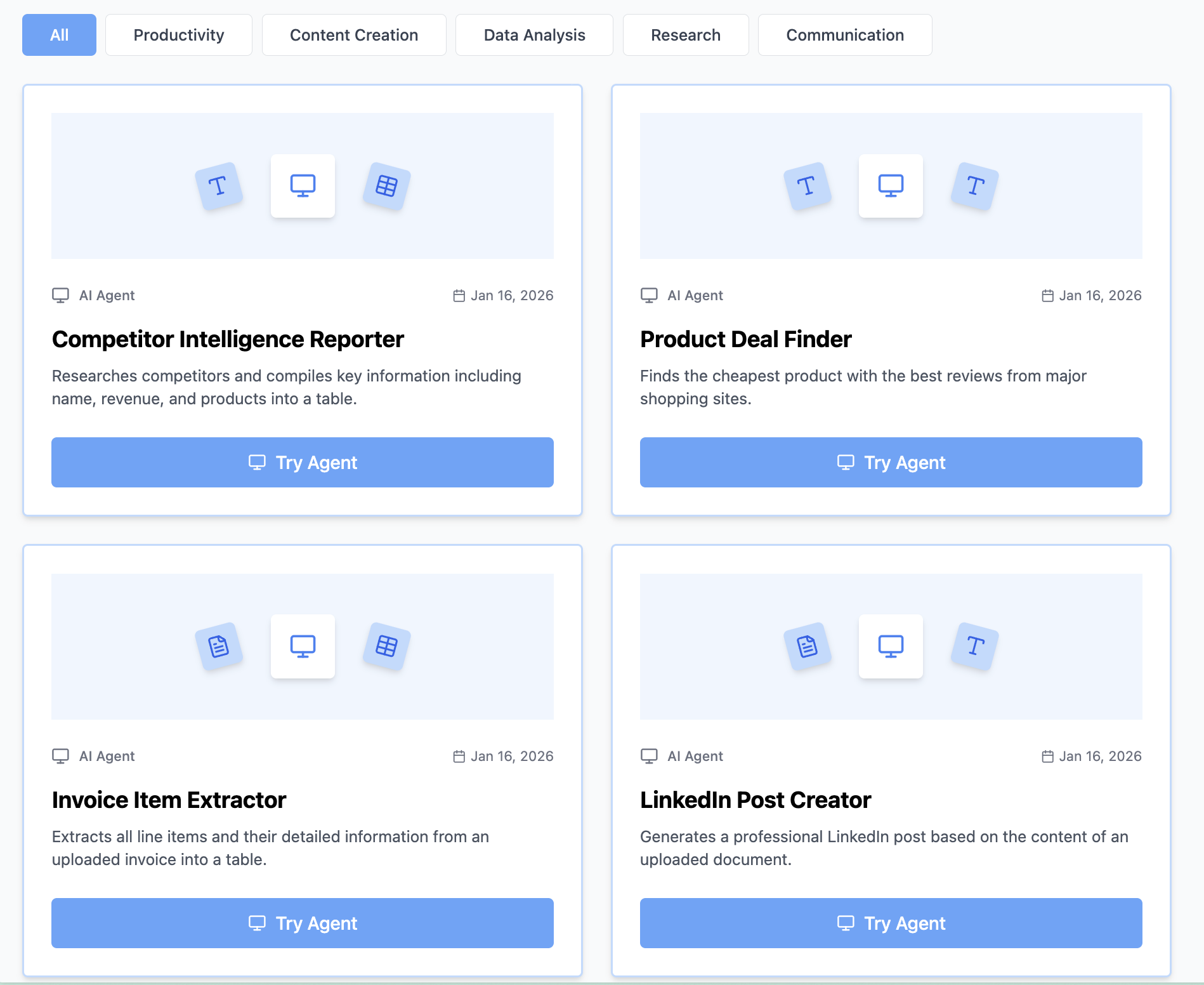
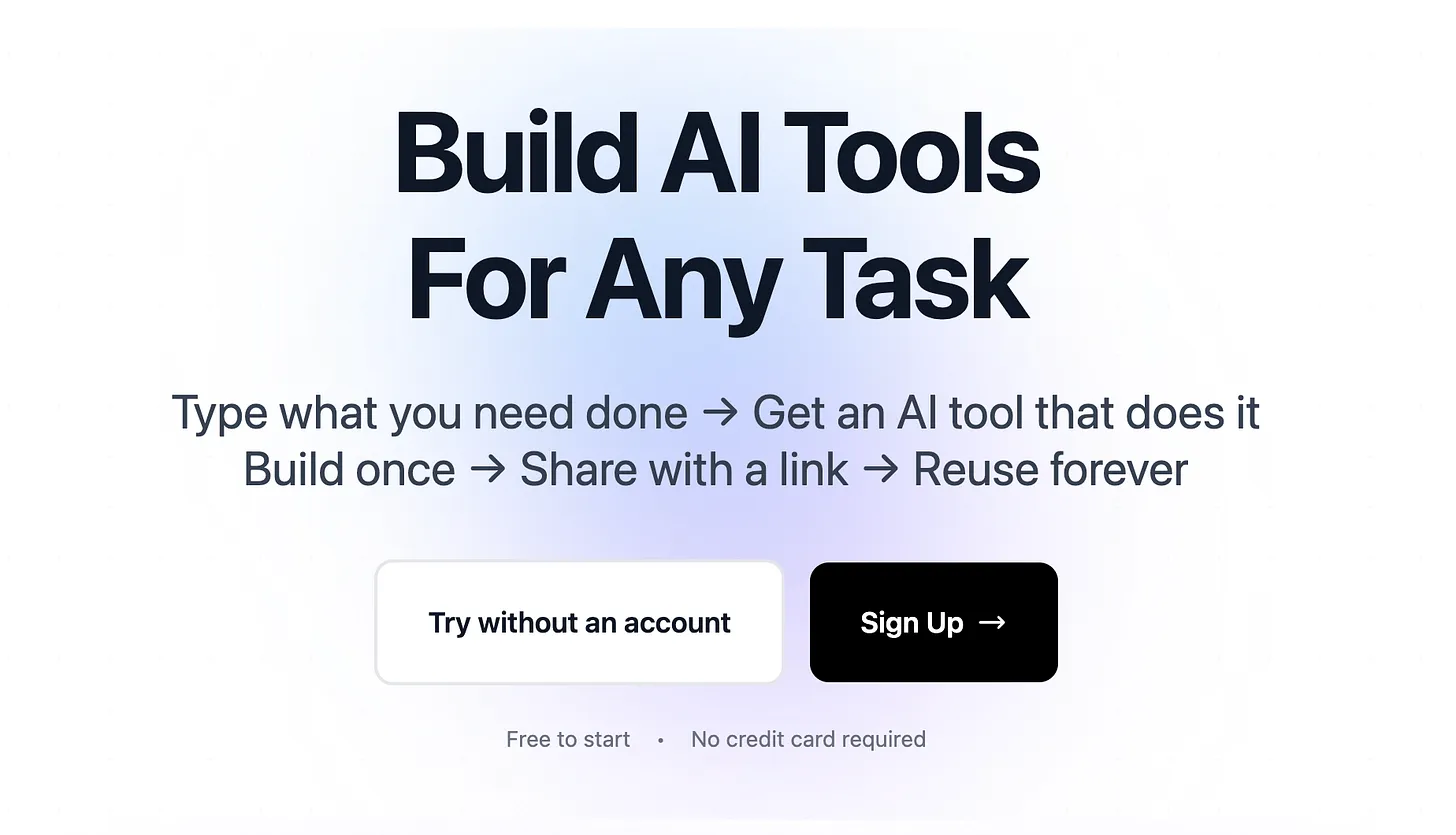
Visit https://www.miskies.app/agents and click "Create+".
Important for legal professionals: Always review AI-generated output for legal accuracy. These tools assist but don't replace professional legal judgment.
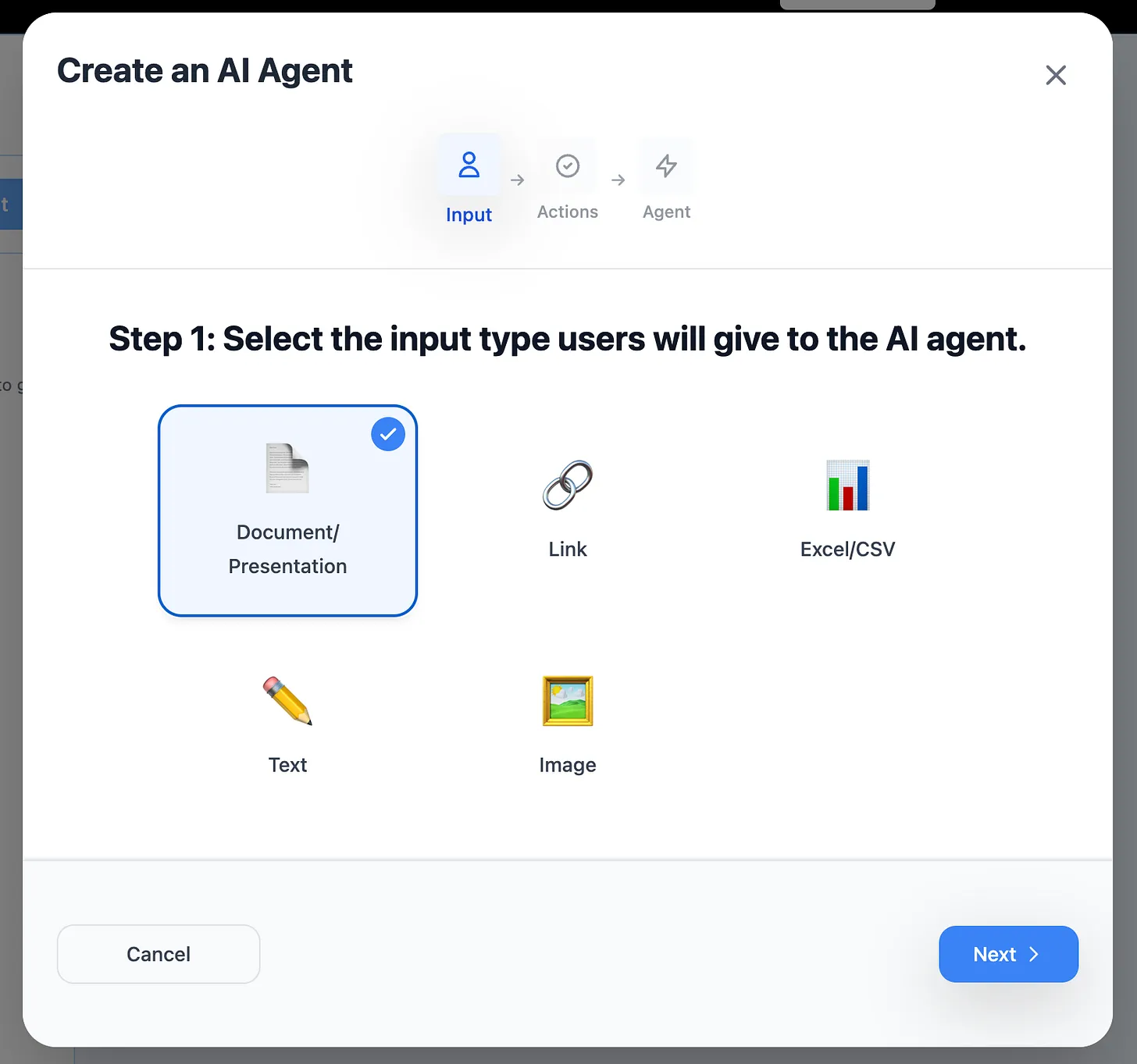
Step 2: Choose Your Input Type
Text Input:
- Case facts, client details, legal issues
- Best for: drafting, communication, analysis
- Examples: demand letters, status updates, memos
File Upload:
- Contracts, court documents, transcripts, discovery materials
- Best for: document review, analysis, extraction
- Examples: contract analyzers, citation extractors, deposition summarizers
Link Input:
- Court dockets, legal databases, regulatory websites
- Best for: research aggregation, update monitoring
- Examples: case law research, regulation tracking
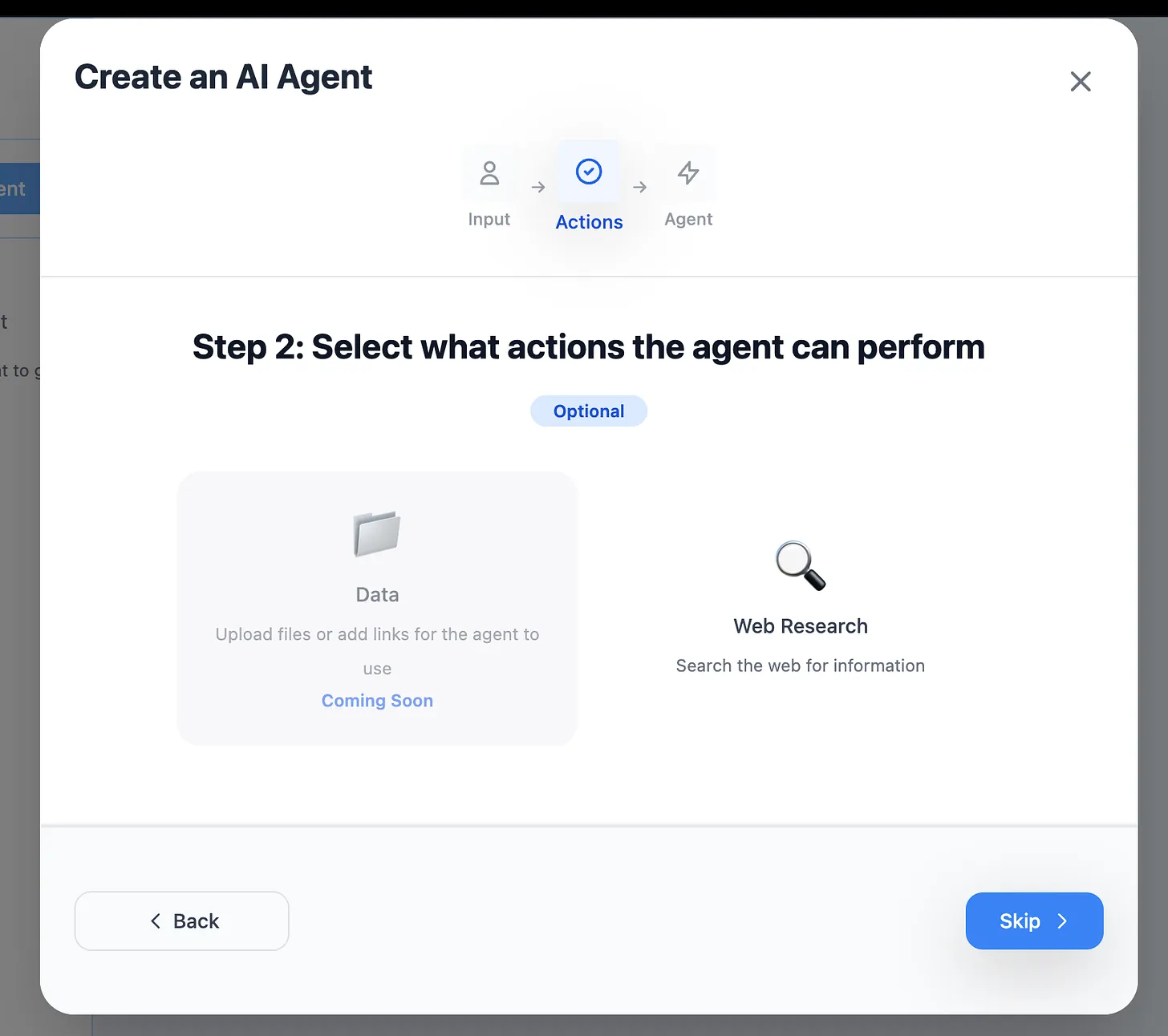
Step 3: Enable Web Research (Optional)
Enable for:
- Recent case law searches
- Statutory updates
- Regulatory guidance
- Legal news monitoring
- Jurisdiction-specific rules
Skip for:
- Contract review (confidential documents)
- Client information processing
- Internal document analysis
- Privileged materials
Step 4: Describe Your Legal Tool
Be specific about legal requirements, jurisdiction, and output format.
Example: Contract Key Terms Extractor
"Analyze uploaded contract and extract key terms into an Excel spreadsheet:
Required Columns:
- Contract Type (identify: NDA, MSA, SLA, Employment, Licensing, etc.)
- Parties (Full legal names of all parties)
- Effective Date (MM/DD/YYYY format)
- Term Length (e.g., '3 years', 'at-will', 'perpetual')
- Termination Date (if fixed term)
- Termination Notice Period (days required)
- Termination for Convenience (Yes/No with clause reference)
- Payment Terms (amount, frequency, due date)
- Liability Cap (dollar amount or 'unlimited')
- Indemnification Scope (Brief description)
- Governing Law (State/Country)
- Dispute Resolution (Litigation/Arbitration/Mediation)
- Non-Compete (Yes/No with duration and geography)
- Confidentiality Period (duration)
- Auto-Renewal (Yes/No with notice period)
Special Instructions:
- If information not found, enter 'Not Specified'
- Flag unusual or high-risk terms in separate 'Notes' column
- Highlight: liability caps under $100K, unlimited liability, unusually long terms >5 years
- Extract exact clause references (e.g., 'Section 7.3')
- If multiple payment terms, list all
Risk Flags:
- Automatic renewal without notice period
- Unlimited liability
- Broad indemnification
- Non-standard termination rights
- Unusually restrictive covenants
Jurisdiction: Multi-state US (note state-specific variations) Practice Area: Commercial contracts"
Example: Legal Memorandum Outliner
"Generate legal memorandum outline using IRAC format:
Format Requirements:
I. QUESTION PRESENTED
- Frame as a specific legal question
- Include relevant facts (who, what, when, where)
- Use format: 'Under [law], whether [facts] constitute [legal issue]?'
II. BRIEF ANSWER
- Direct yes/no answer first sentence
- 2-3 sentences explaining conclusion
- Cite controlling authority
III. FACTS
- Chronological narrative
- Only legally significant facts
- Neutral tone (no legal conclusions)
- Client identified as 'Client' for confidentiality
IV. ANALYSIS (For each issue:)
A. [Issue Statement]
-
Rule
- State black letter law
- Primary authority citation (statute, regulation, or leading case)
- Elements or factors to apply
- Any relevant exceptions
-
Case Law Application
- 2-3 analogous cases
- For each: facts, holding, reasoning
- Compare/contrast to client facts
- Note if binding or persuasive authority
-
Application to Facts
- Apply each element/factor
- Address favorable facts
- Address unfavorable facts
- Distinguish contrary authority
-
Counterarguments
- Strongest opposing arguments
- Rebuttal to each
V. CONCLUSION
- Restate answer
- Summarize key reasoning
- Note any additional research needed
- Practical recommendations if applicable
Citation Format: Bluebook 21st Edition Tone: Objective, analytical, clear Length Guidance: Each issue section 2-3 pages single-spaced Jurisdiction: [Specify - e.g., Federal, California, New York] Practice Area: [Specify - e.g., Employment Law, Commercial Litigation]"
Example: Client Status Update Generator
"Convert case notes into client-friendly status update email:
Email Structure:
Subject Line: [Case Name] - Update [Month YYYY]
Opening:
- Warm but professional greeting
- Brief context reminder (1 sentence about case)
Status Update:
-
Recent Activity (What we did this month)
- Court filings, discovery, depositions, meetings
- Translate legal jargon: 'motion for summary judgment' → 'request asking judge to decide case without trial'
-
Current Status (Where we are now)
- Clear milestone description
- Timeline context ('halfway through discovery', 'awaiting court decision')
-
Next Steps (What happens next)
- Specific upcoming actions
- Expected timeframes
- What client needs to do (if anything)
Key Developments:
- Highlight any significant events
- Explain implications in plain language
- Note any changes to strategy or timeline
Questions/Action Items:
- List any open questions for client
- Documents or information needed
- Upcoming meetings or deadlines
Closing:
- Reassurance/confidence statement
- Invitation to call with questions
- Professional sign-off
Writing Guidelines:
- 8th grade reading level (no legal jargon without explanation)
- Active voice preferred
- Short paragraphs (3-4 sentences max)
- Bullet points for lists
- Positive framing while being honest
- Never: assume client understanding of legal terms, be overly optimistic, make guarantees about outcome
Tone: Professional yet warm, confident but realistic, proactive Length: 300-500 words (email should be scannable) Disclaimer: Include standard 'this is not legal advice' footer if firm requires"
Step 5: Generate and Test Your Legal Tool
Click "Design Agent" and wait 5-10 seconds.
Test with actual legal documents:
- Use redacted or sample contracts (never confidential client docs initially)
- Test with documents from your practice area
- Verify legal accuracy against manual review
- Check for jurisdiction-specific requirements
Critical: Always perform quality control on AI output before relying on it for client matters.
Legal-Specific Best Practices
Maintain Confidentiality & Ethics
Confidential information handling: "Never include client names, specific case identifying information, or confidential facts in tool descriptions. Use placeholders like 'Client', 'Opposing Party', '[Company Name]'. Test tools with redacted or hypothetical examples only."
Privilege protection: "Flag potentially privileged communications: attorney-client communications, work product, expert consultations. Add warning to output: 'PRIVILEGED AND CONFIDENTIAL - ATTORNEY WORK PRODUCT' when applicable."
Conflict checks: "Before using client information in tool, verify no conflicts exist. Maintain separate tools for different clients if necessary to avoid cross-contamination of confidential information."
Ethics compliance: "All tools must comply with professional responsibility rules: competence (supervise AI output), confidentiality (secure processing), candor to tribunal (verify all facts and citations), communication (clear about AI assistance if required by jurisdiction)."
Ensure Legal Accuracy
Jurisdiction-specific requirements: "This tool is designed for [California/Federal/Multi-State] jurisdiction. Legal standards, procedural rules, and citation formats follow [California Code/Federal Rules/specific court local rules]. Flag jurisdiction-specific variations."
Citation verification: "All case law citations must include: case name, volume, reporter, page, court, year. Example: Jones v. Smith, 123 F.3d 456 (9th Cir. 2020). Flag if citation cannot be verified - never fabricate citations."
Current law validation: "Check if legal authority is: (1) still good law (not overruled), (2) binding or persuasive in jurisdiction, (3) on point factually and legally. Add warning if authority may be outdated: 'Verify this case is still good law before citing.'"
Legal terminology precision: "Use precise legal terms: 'motion for summary judgment' not 'summary judgment motion', 'plaintiff' not 'complainant' (unless criminal), 'defendant' not 'defense'. Maintain term consistency throughout document."
Format for Legal Standards
Court document formatting: "Follow local court rules for [jurisdiction]. Standard format: 12-point Times New Roman, double-spaced, 1-inch margins, numbered pages, line numbers if required. Caption format: [specify court's caption requirements]. Certificate of service at end."
Contract drafting standards: "Follow commercial contract conventions: (1) Definitions section uses 'shall mean', (2) Obligations use 'shall', 'will', or 'must', (3) Prohibitions use 'shall not' or 'may not', (4) Discretion uses 'may', (5) Avoid 'and/or'. Number sections hierarchically."
Professional correspondence: "Law firm letterhead format. Date line. Recipient address block. Reference line: 'Re: [Matter Name]'. Professional salutation. Block paragraphs, no indentation. Enclosures noted. Sign with full credentials (J.D., Esq., bar admissions)."
Handle Legal Edge Cases
Missing critical information: "If essential legal elements are missing from input (e.g., statute of limitations analysis without claim date), output: '[REQUIRES MANUAL REVIEW: Missing [specific information] - cannot complete analysis]'. Never guess at legal facts."
Conflicting authorities: "If case law conflicts: (1) Note split of authority, (2) Present majority and minority rules, (3) Identify which is binding in jurisdiction, (4) Explain differences in reasoning, (5) Recommend approach with risk assessment."
Ambiguous contract language: "If contract clause is ambiguous: (1) Note ambiguity, (2) Provide possible interpretations, (3) Apply contra proferentem if applicable, (4) Reference relevant extrinsic evidence if mentioned, (5) Recommend clarification in negotiation."
Out-of-scope legal issues: "If input raises legal issues outside tool's scope (e.g., criminal implications in contract review), flag: 'ADVISORY: This matter may involve [issue type]. Consider consulting [specialist type] attorney.' Don't ignore potential issues."
Real-World Impact: Legal Practice Case Studies
Case Study: Solo Practitioner (General Practice)
Challenge: 15+ hours weekly on contract review for small business clients
Tools Built:
- Contract Key Terms Extractor
- Standard Contract Deviation Detector
- Client Status Update Generator
Results:
- Contract review time: 45 min → 15 min per contract
- Extracted data enabled searchable contract database
- Client communication improved (consistent updates)
- Took on 40% more clients without hiring
- Annual time savings: 720+ hours
- Revenue increase: $75,000 (additional matters)
Case Study: Mid-Size Firm (Corporate Law)
Challenge: Associates spending 20+ hours weekly on routine contract analysis
Tools Built:
- NDA Analyzer (99% of NDAs reviewed)
- M&A Due Diligence Document Summarizer
- Contract Redline Risk Analyzer
Results:
- Junior associate time on NDAs: 100% reduction
- Reallocated time to complex matters
- Due diligence efficiency: 3x faster
- Fewer missed redline issues
- Annual time savings: 2,000+ hours across associates
- Cost savings: $400,000 (reduced associate hours on routine work)
Case Study: Litigation Boutique (15 attorneys)
Challenge: Deposition summaries, discovery review overwhelming junior attorneys
Tools Built:
- Deposition Summary Generator
- Discovery Document Relevance Scorer
- Case Timeline Generator from Documents
Results:
- Deposition summary time: 2 hours → 30 min
- Discovery review: 40% faster
- Senior attorneys access info faster
- Better trial preparation
- Annual time savings: 1,500+ hours
- Increased case capacity: 25%
Case Study: In-House Legal (Tech Company)
Challenge: Contract backlog, slow vendor onboarding, compliance tracking
Tools Built:
- Vendor Contract Analyzer (payment terms, liability, IP)
- Contract Renewal Calendar Generator
- Privacy Policy Compliance Checker (GDPR/CCPA)
Results:
- Vendor onboarding: 5 days → 1 day
- Never missed contract renewal (automated alerts)
- Compliance audits: 8 hours → 2 hours
- Proactive risk management
- Annual time savings: 800+ hours
- Avoided missed renewals: Estimated $2M savings
Advanced Legal Tool Strategies
Build a Practice-Specific Tool Suite
Transactional Practice:
- Contract template comparison
- Deal timeline generator
- Closing checklist creator
- Post-closing deliverables tracker
- Entity formation document generator
Litigation Practice:
- Complaint analyzer (claims, parties, facts)
- Discovery timeline calculator
- Motion schedule tracker
- Trial preparation checklist
- Appeal deadline calculator
Corporate Practice:
- Board resolution drafter
- Corporate minute taker
- Securities filing analyzer
- Compliance calendar generator
- Officer and director questionnaire processor
Family Law Practice:
- Financial disclosure organizer
- Child support calculator document
- Parenting plan drafter
- Asset division worksheet
- Settlement proposal generator
Intellectual Property:
- Trademark clearance search summary
- Patent claims analyzer
- Licensing agreement key terms
- Infringement analysis framework
- IP portfolio tracker
Integrate into Legal Workflow
Matter opening workflow:
1. Conflicts check → Conflict Check Tool
2. Engagement letter → Engagement Letter Generator
3. Initial case assessment → Issue Identifier Tool
4. Client communication → Status Update Tool
5. Budget creation → Matter Budget Tool
Contract lifecycle workflow:
1. Initial review → Key Terms Extractor
2. Redline analysis → Change Analyzer
3. Risk assessment → Deviation Detector
4. Client advice → Risk Summary Generator
5. Database entry → Contract Data Extractor
Litigation workflow:
1. Complaint analysis → Claims Identifier
2. Discovery planning → Discovery Request Generator
3. Document review → Relevance Scorer
4. Deposition prep → Deposition Outline Creator
5. Trial prep → Exhibit List Generator
Create Firm-Wide Standards
Document conventions: "All firm contracts use: (1) Defined terms in Title Case, (2) Section numbering format X.X.X, (3) Exhibits lettered A-Z, (4) Signature blocks with print name and date line, (5) Notary block for recorded documents."
Legal citation style: "Firm uses Bluebook 21st Edition with modifications: (1) Omit 'at' before page numbers, (2) Use comma before court and year, (3) Short form after first full citation, (4) Id. for immediately preceding citation, (5) Supra for earlier citations."
Client communication standards: "All client communications must: (1) Use plain language for legal concepts, (2) Provide context for next steps, (3) Include action items section, (4) Note any deadlines, (5) Invite questions. Avoid: legal jargon without explanation, passive voice, unnecessarily alarming language."
Measure Legal Practice Efficiency
Track metrics:
- Average contract review time
- Document turnaround time
- Billable vs. non-billable hours ratio
- Matter profitability
- Client satisfaction scores
- Time to close matters
Calculate ROI for legal tools:
Time Saved per Contract: 30 minutes
Billable Rate: $300/hour
Value per Contract: $150
Contracts per Month: 40
Monthly Value: $6,000
Annual Value: $72,000

Cost: $0 (free tier)
ROI: Infinite + enabled taking more clients
Common Mistakes When Building Legal Tools
Mistake #1: Insufficient Legal Specificity
Problem: "Analyze this contract and tell me about it"
Solution: "Analyze uploaded contract and identify: (1) Payment terms with due dates and late fees, (2) Termination rights (for cause, convenience, material breach), (3) Liability provisions (caps, exclusions, indemnification), (4) IP ownership and licensing, (5) Dispute resolution (arbitration clause, jury waiver, forum selection). Flag any: unlimited liability, automatic renewal, broad non-compete, unusual termination provisions. Jurisdiction: California commercial law."
Mistake #2: Missing Jurisdiction Requirements
Problem: Generic legal analysis not specific to applicable jurisdiction
Solution: "Apply [California/New York/Federal] law. Consider jurisdiction-specific requirements: [State] statute of limitations for [claim type] is [X years]. Follow [State] contract interpretation principles: favor reasonableness, construe ambiguities against drafter, apply plain meaning. Note any conflicts of law issues if multi-state."
Mistake #3: No Quality Control Mechanisms
Problem: Tool output used without verification
Solution: "QUALITY CONTROL REQUIRED: All outputs must be reviewed by licensed attorney before use in client matters. Verify: (1) Legal accuracy of analysis, (2) Current status of cited authorities, (3) Completeness of extraction, (4) Jurisdiction-specific requirements met, (5) No confidential info inadvertently included. Add to output: 'DRAFT FOR ATTORNEY REVIEW - DO NOT FILE OR SEND WITHOUT SUPERVISION'."
Mistake #4: Inappropriate Confidential Information
Problem: Using actual client information in tool descriptions or tests
Solution: "Test with: (1) Redacted documents (black out names, dates, amounts), (2) Sample contracts from public sources, (3) Hypothetical fact patterns, (4) Old matters with no ongoing confidentiality concerns. NEVER use: active client matters, privileged communications, sealed documents, or anything marked confidential."
Mistake #5: Inadequate Citation Standards
Problem: Missing or imprecise legal citations
Solution: "All citations must include complete information: Case Name v. Opposing Party, Volume, Reporter, First Page, Pinpoint Page (Court, Year). Example: Johnson v. Smith, 123 F.3d 456, 459 (9th Cir. 2020). Statutes: Code Name § Section (Year). Example: 42 U.S.C. § 1983 (2018). If citation cannot be fully completed from input, mark as [VERIFY CITATION]."
Legal Tool Ideas by Practice Area
Corporate & Transactional
- Stock purchase agreement key terms
- Board consent resolution drafter
- Operating agreement analyzer
- Securities filing summarizer
- Corporate compliance calendar
- Officer and director questionnaire
- Shareholder agreement analyzer
- Merger agreement redline summary
Litigation & Dispute Resolution
- Statute of limitations calculator
- Motion in limine drafter
- Voir dire question generator
- Settlement demand calculator
- Appeal brief outliner
- Expert witness report critique
- Jury instruction compiler
- Mediation brief writer
Real Estate
- Purchase agreement analyzer
- Title report issue identifier
- Lease abstracting tool
- Zoning compliance checker
- Property due diligence checklist
- Closing disclosure reviewer
- Easement agreement analyzer
- 1031 exchange documentation
Employment Law
- Employment agreement analyzer
- Separation agreement drafter
- EEOC charge response outliner
- Employee handbook compliance checker
- Non-compete agreement reviewer
- Wage and hour audit tool
- Workplace investigation summary
- FMLA documentation tracker
Intellectual Property
- Patent application section drafter
- Trademark application analyzer
- License agreement key terms
- Copyright registration helper
- IP assignment agreement checker
- Infringement cease and desist
- Freedom to operate analysis
- IP due diligence report
Family Law
- Financial affidavit organizer
- Parenting plan provisions
- Property division worksheet
- Spousal support calculator
- Prenuptial agreement analyzer
- Divorce settlement summary
- Custody evaluation summarizer
- Post-judgment modification request
Immigration
- Visa application document checker
- Immigration timeline calculator
- Evidence organizer (marriage-based)
- Hardship waiver argument builder
- Consular processing checklist
- Employment verification letter
- Travel document tracker
- Deportation defense outline
Estate Planning
- Will provisions analyzer
- Trust document key terms
- Beneficiary designation checker
- Estate tax estimation
- Healthcare directive drafter
- Power of attorney analyzer
- Probate timeline calculator
- Estate inventory organizer
Bankruptcy
- Asset and liability scheduleorganizer
- Exemptions analyzer
- Means test calculator
- Creditor matrix generator
- Statement of financial affairs
- Reaffirmation agreement analyzer
- Discharge order checklist
- Adversary proceeding outline
Compliance & Professional Responsibility
Unauthorized Practice of Law Concerns
Clear positioning: "These AI tools are for use by licensed attorneys and supervised legal professionals only. They assist with legal work but do not provide legal advice to non-attorneys. Always include disclaimer: 'This tool output must be reviewed by a licensed attorney before use in any legal matter.'"
Supervision requirements: "All AI-generated legal work must be supervised by licensed attorney. Attorney is responsible for: (1) Verifying legal accuracy, (2) Ensuring compliance with jurisdiction rules, (3) Maintaining client confidentiality, (4) Meeting professional standards. AI is a tool, not a substitute for attorney judgment."
Competence & Technology
Duty of competence: "Attorneys using AI tools must: (1) Understand tool capabilities and limitations, (2) Verify output accuracy, (3) Stay informed of AI developments in legal practice, (4) Provide appropriate supervision of AI-assisted work, (5) Disclose AI use if required by jurisdiction."
Technology competence: "Under Model Rule 1.1 Comment 8, lawyers must stay abreast of technology benefits and risks. Document: (1) AI tool selection criteria, (2) Testing and validation process, (3) Ongoing quality monitoring, (4) Training for legal staff, (5) Security measures for client data."
Disclosure & Billing
Client disclosure: "Some jurisdictions may require disclosing AI use to clients. Sample disclosure: 'Our firm uses AI-assisted tools for routine document review, research, and drafting. All AI output is reviewed and approved by licensed attorneys before use in your matter. This allows us to provide efficient, high-quality legal services.'"
Billing transparency: "When AI tools reduce time spent, bill appropriately: (1) Don't bill full manual time when AI assisted, (2) Do bill for attorney review and validation of AI output, (3) Consider value billing for matters where AI significantly increases efficiency, (4) Be transparent with clients about efficiency improvements."
Get Started with Legal AI Tools Today
Stop spending 50% of your time on routine legal tasks. Build custom AI tools that automate document review, client communication, and case preparation—with no technical skills required.
Your first legal tool checklist:
- ✅ Identify your most time-consuming routine task
- ✅ Visit Miskies AI Agents
- ✅ Click "Create+"
- ✅ Choose input type (text/file/link)
- ✅ Define jurisdiction and practice area
- ✅ Specify legal format and citation requirements
- ✅ Click "Design Agent"
- ✅ Test with redacted/sample documents
- ✅ Implement attorney review protocol
- ✅ Share with legal team
Free to Start • No Coding Required • Practice Area-Specific • Confidential Processing
Popular First Tools for Legal Professionals:
Quick wins (10-20 min saved):
- Contract key terms extractor
- Time entry narrative generator
- Client status update writer
High-impact (30-60 min saved):
- Deposition summary generator
- Contract redline analyzer
- Legal memo outliner
Game-changers (90-180 min saved):
- Discovery document reviewer
- Due diligence summarizer
- Trial preparation organizer
Real Attorney Testimonial
"I built a contract key terms extractor in 45 seconds. What used to take me 30 minutes per contract now takes 5 minutes. I've reviewed 200+ contracts with this tool, saving 80+ hours. That's 80 hours I spent on complex legal analysis instead of data entry." — Corporate Attorney, Mid-Size Firm
Legal Tech Ethics Note
Always maintain professional responsibility standards when using AI tools. These tools assist but don't replace attorney judgment, supervision, or expertise. Verify all AI outputs for legal accuracy before use in client matters.
Need help optimizing your legal AI tools? Our team understands legal workflows and responds within 24 hours.
Join thousands of legal professionals using AI tools to automate routine work, focus on high-value legal analysis, and deliver better client service.
Keywords: AI tools for lawyers, legal automation tools, contract review AI, legal document automation, law practice management, legal tech tools, AI for attorneys, legal workflow automation, legal research tools, practice efficiency tools